Rotation builder
Updated October 18, 2026
The rotation builder is the KeyRota window where you put an advanced rotation together without typing it: slots with flags, auras, rules, with the KRC text and the JSON beside them. The documentation is the same for Windows and macOS; the screenshots were taken on Windows. They show the Assassination raid rotation from the examples.
Opening it#
- Your rotation. Select the profile in the Rotation block of the main window and click Configure.
- A new rotation. New — In the builder…. The specialization comes from the game or from the current profile. The rotation becomes a profile when you first save it.
- From a file or the clipboard. New — From file… accepts KRC text (
.txt), rotation JSON and a KeyRota profile file; New — From clipboard takes the same from the clipboard. Open the new profile in the builder with Configure.
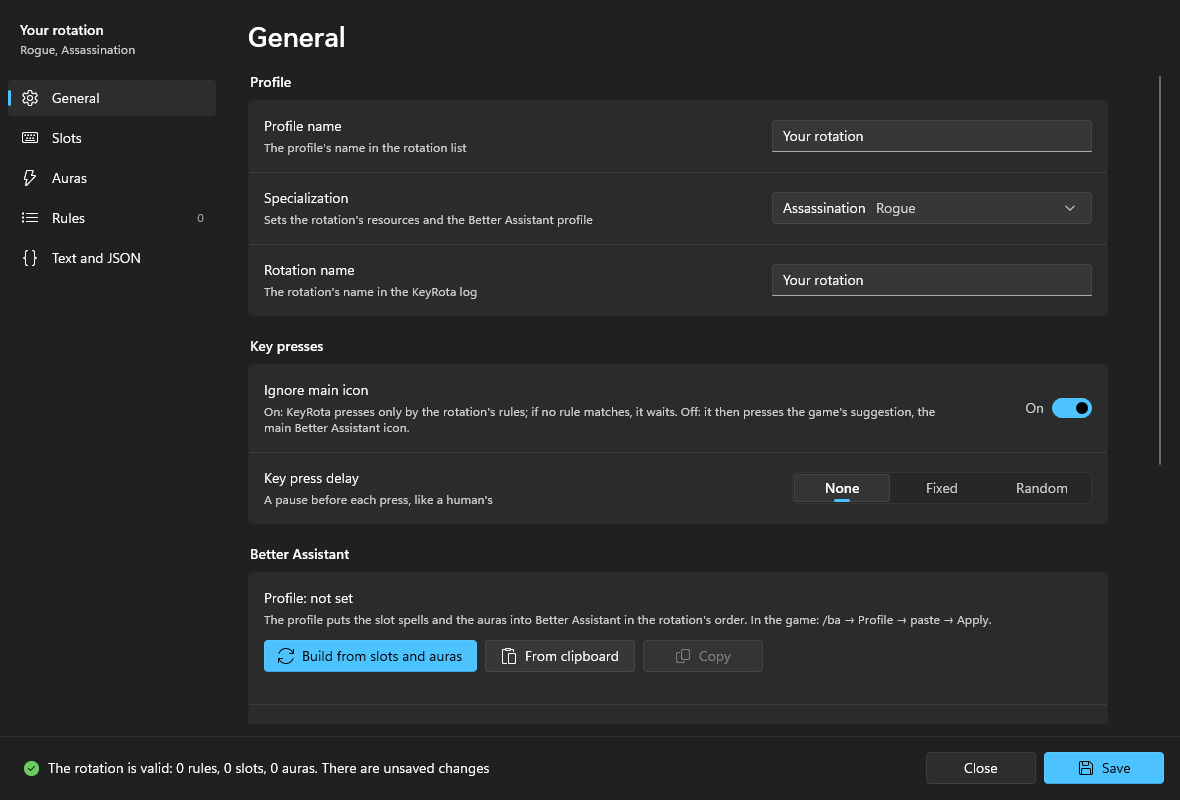
For a Blizzard profile the builder shows only the name and the key press delay: the game picks the main button. "Build your own rotation" creates a new profile with an advanced rotation; the Blizzard profile stays in the list.
The window#
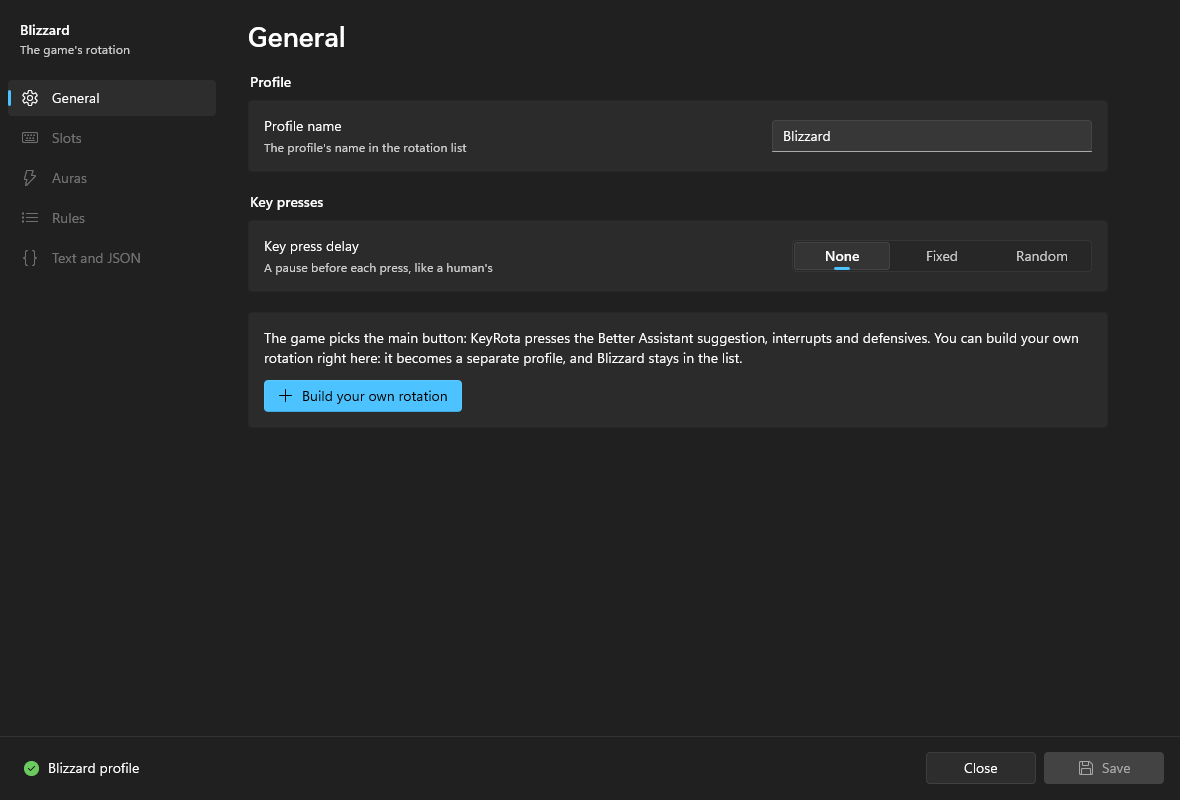
- On the left, the pages: General, Slots, Auras, Rules (with the number of rules), Text and JSON. Above them, "Your rotation" and the chosen specialization.
- On the right, the selected page.
- At the bottom, the status bar: whether the rotation is valid ("The rotation is valid: 15 rules, 11 slots, 10 auras"), whether there are unsaved changes and, on an error, where it is and a Show button. On the right, Close and Save.
Nothing is applied until Save (on Windows also Ctrl+S).
General#
| Control | What it does |
|---|---|
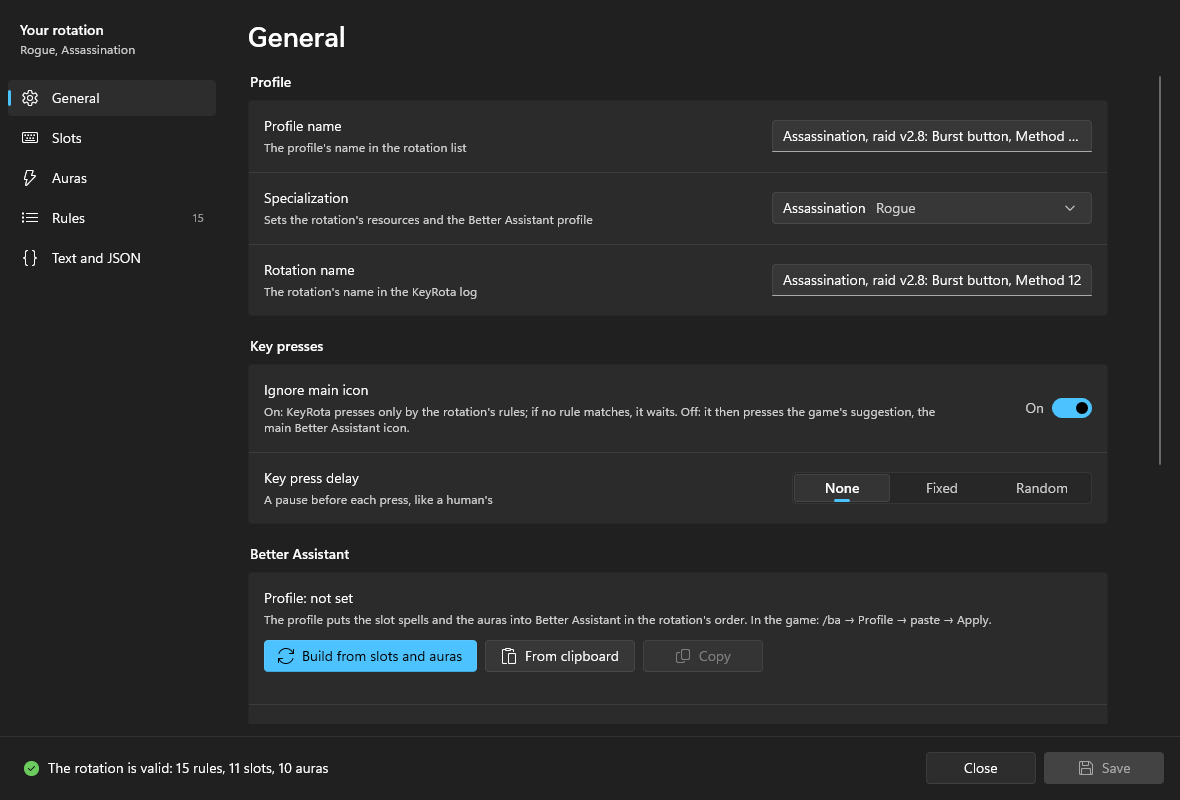
| Profile name | The profile's name in the main window's rotation list. |
| Specialization | Sets the rotation's resources (energy, combo points, rage…) and the class and specialization of the Better Assistant profile. Changing it replaces the resources unless the rules read the old specialization's resources (health doesn't count). |
| Rotation name | The first line of the KRC text (rotation "…"), shown in the KeyRota log. No double quotes. A good place for the version: "Assassination v1.3". |
| Ignore main icon | On: KeyRota presses only by the rules; if no rule matches, it waits. Off: it then presses the game's suggestion. Usually on for your own rotations: waiting (for example, pooling energy) is normal. |
| Key press delay | A pause before each press, like a human's: None, Fixed (an interval of 0–1000 ms) or Random (a range of 0–1000 ms). "Also for interrupts and defensives" applies the same pause to those. |
| Control | What it does |
|---|---|
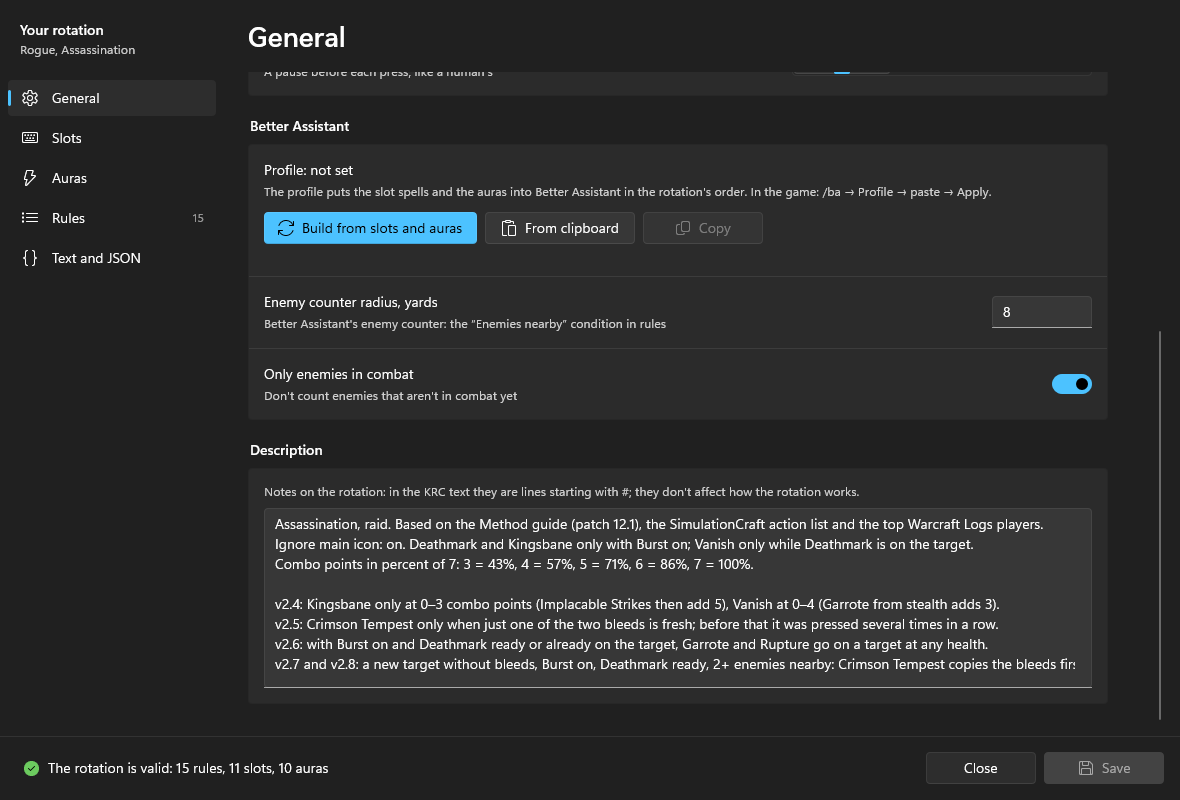
| Profile: … | A summary of the Better Assistant profile string: specialization, number of spells and auras. |
| Build from slots and auras | Builds the Better Assistant profile string from the slots' spell IDs, each slot's "Better Assistant shows it" setting, the auras in order, the specialization, the radius and Only enemies in combat. If a profile of the same specialization is already pasted, its other settings are kept. |
| From clipboard | Paste a ready profile string. Its specialization must match the rotation's. |
| Copy | Copy the string to paste it in the game. |
| Enemy counter radius, yards | 1–100, 8 by default. Used by the "Enemies nearby" condition (enemies). |
| Only enemies in combat | On by default: enemies that aren't in combat yet aren't counted. |
| Description | Notes on the rotation: lines starting with # in the KRC text. They don't affect how the rotation works. |
Warnings appear under the buttons: which slots used in rules have no spell ID (they won't be in the Better Assistant profile) and what in an already pasted profile doesn't match the rotation.
Important
Auras in the Better Assistant profile go in a row, starting from the first. If aura 3 has no ID and aura 4 has one, the profile won't build: "Aura 3 has no spell number". Fill in the ID or renumber the auras.
The Better Assistant profile in the game#
Rotation slot N is slot N in Better Assistant, aura N is aura N in its list. The profile string puts your slots and auras there in the right order.
- On the General page click "Build from slots and auras", then "Copy".
- In the game type
/ba, open the Profile tab, paste the string, click Apply and confirm. - After any change to slots or auras (IDs, order, With a target / In combat) build and paste the profile again.
Slots#
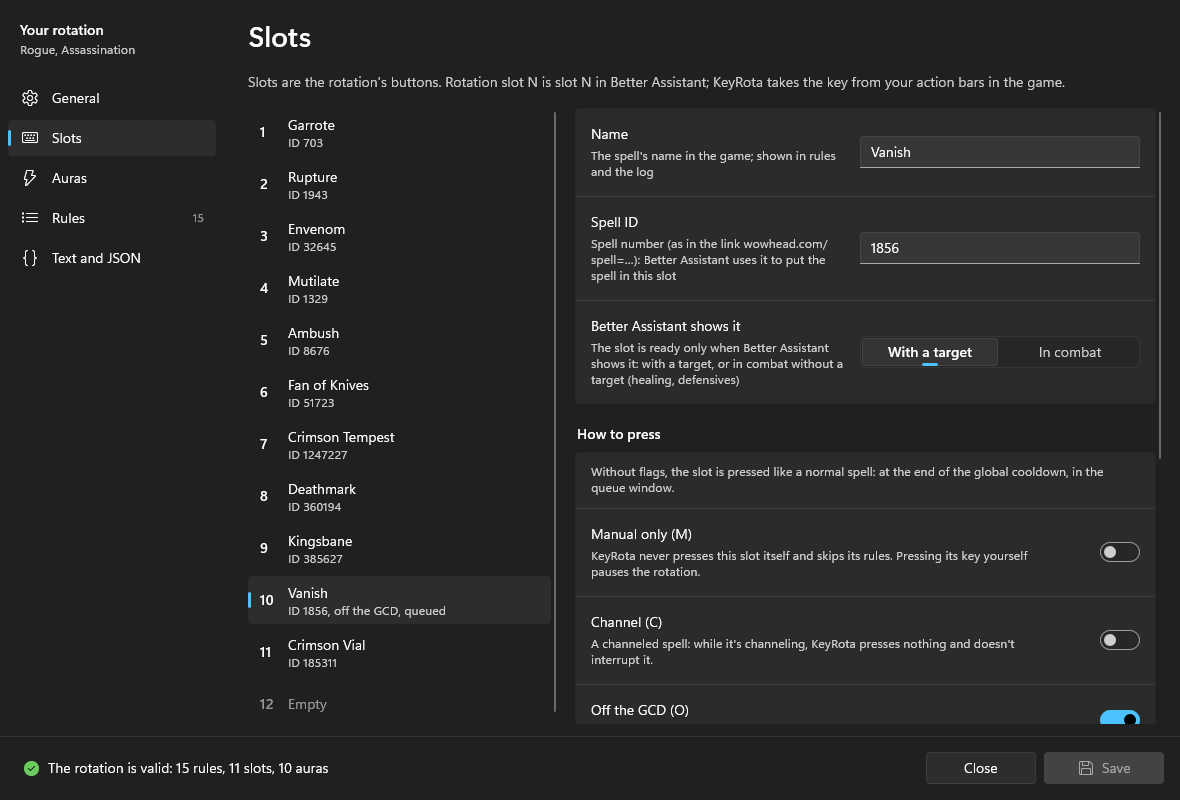
On the left are the 12 places: number, name, spell ID, flags ("off the GCD, queued") and "unused" when the slot isn't in any rule. An empty place says "Empty"; select it to get an "Add slot" button.
| Control | What it does |
|---|---|
| Name | The spell's name in the game. Shown in the rule list and the log. |
| Spell ID | The number in the Wowhead link: in wowhead.com/spell=1856/vanish it is 1856. Better Assistant uses it to put the spell into this slot. |
| Better Assistant shows it | With a target or In combat. The slot is ready only when Better Assistant shows it. In combat is for healing and defensives that must work without a target. |
| How to press | Four flag switches, see the table below. |
| Name in text | The slot's name in rules and in the KRC text: letters, digits and _, no spaces. |
| Comment | A comment at the end of the declaration line in the text. |
| Used in rules | The rules that press or read the slot. "Remove slot" is available only when the slot is unused. |
For KeyRota to press a slot, its spell must be on an action bar in the game with a key bound: KeyRota takes the key from your bars. A macro with #showtooltip Name works too. A slot without a key is never pressed.
How to press: flags#
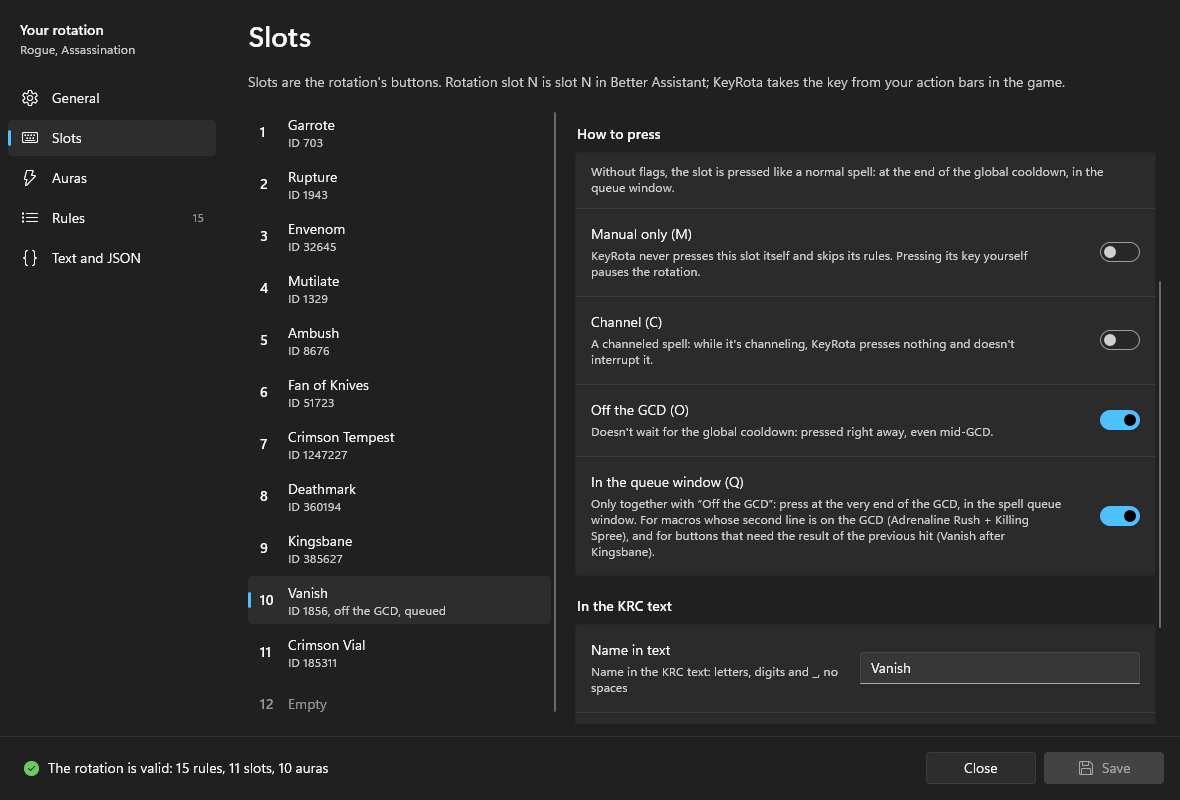
| Switch | What it does | When to use it |
|---|---|---|
| no flags | The slot is pressed like a normal spell: at the end of the global cooldown, in the queue window. | Almost every spell on the GCD. |
| Manual only (M) | KeyRota never presses this slot itself and skips its rules. Pressing its key yourself pauses the rotation. | Abilities you want to press only yourself. |
| Channel (C) | While this spell channels, KeyRota presses nothing and doesn't interrupt it. | Channeled spells such as Killing Spree. |
| Off the GCD (O) | Doesn't wait for the global cooldown: pressed right away, even mid-GCD. | Off-GCD spells such as Keep It Rolling. |
| In the queue window (Q) | Only together with Off the GCD: press at the very end of the GCD, in the spell queue window. | Macros whose second line is on the GCD (Adrenaline Rush + Killing Spree), and buttons that need the previous hit's result (Vanish after Kingsbane). |
Every flag combination and its JSON is in Slot flags.
Auras#
![The Auras page: aura 1 "Garrote on target [703]", ID 703, name in text Garrote_DoT, used in rules 3, 4, 5, 7, 8, 10](/documentation/img/en/editor-auras.png?v=20261018u)
Auras are your buffs and your debuffs on the target that the rules read. Rotation aura N is aura N in the Better Assistant list.
| Control | What it does |
|---|---|
| Name | The aura's name; shown in rules. Handy with the ID in brackets: "Garrote on target [703]". |
| Spell ID | The aura's number on Wowhead. Better Assistant looks for it among your buffs and your debuffs on the target. |
| Name in text, Comment | As for slots. |
| Used in rules | Where the aura is read. "Remove aura" works only for an unused aura. |
Note
An aura's ID and the ID of the spell that applies it can differ. The Vanish spell is 1856, the buff it gives is 11327; Stealth is 1784, Stealth with the Subterfuge talent is 115191. Check the ID of the buff or debuff itself on Wowhead.
Only your auras are visible: buffs you put on yourself and debuffs you put on the target. Buffs from other players and other players' debuffs on the target aren't seen by the rules.
Rules#
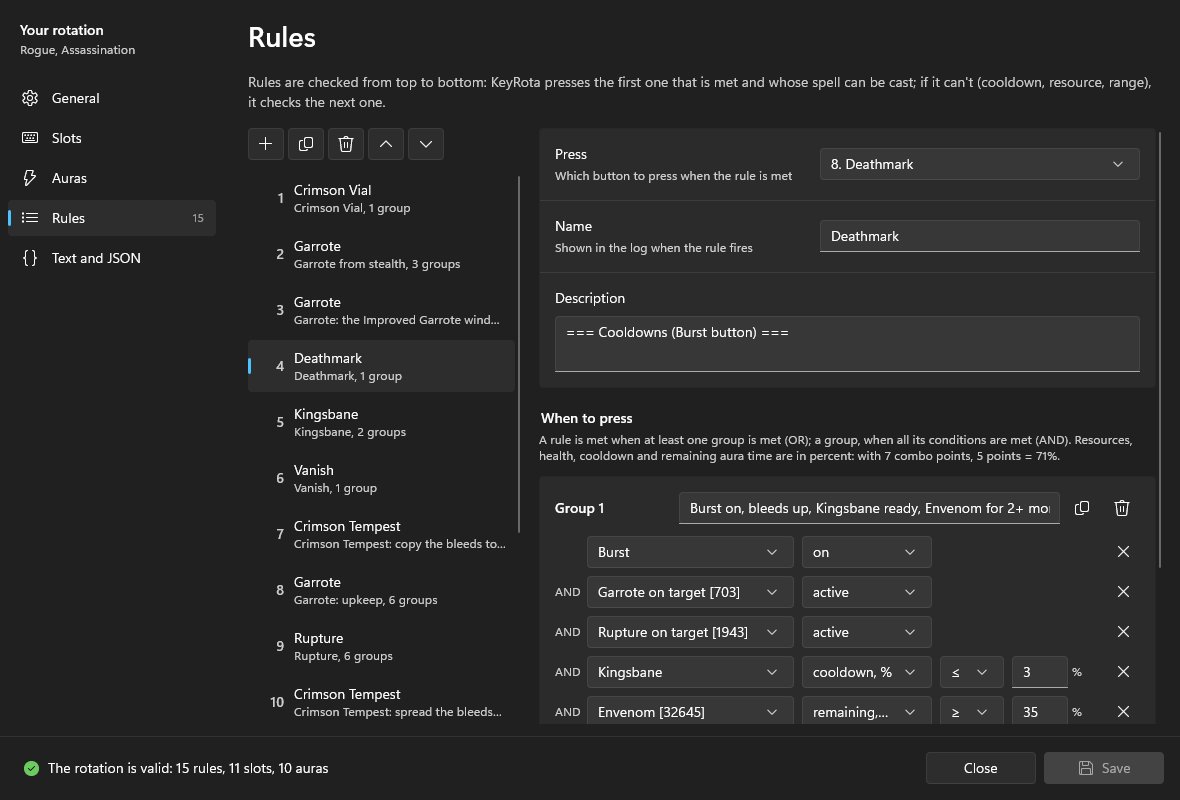
Rules are checked from top to bottom: KeyRota presses the first one that is met and whose spell can be cast; if it can't (cooldown, resource, range), it checks the next one.
The toolbar above the list:
| Button | What it does |
|---|---|
| + | A new rule below the selected one. It presses the first slot and has no conditions yet. |
| Duplicate | A copy of the rule below it. |
| Bin | Delete the rule. |
| Up, Down | Move up (checked earlier) or down (checked later). |
Each rule in the list shows its number (the priority), the slot, the name and the number of groups; a rule with an error has a red mark.
The selected rule:
| Control | What it does |
|---|---|
| Press | Which slot to press when the rule is met. |
| Name | Shown in the log when the rule fires. |
| Description | Notes above the rule in the KRC text. |
| When to press | Condition groups: the rule is met when at least one group is met (OR); a group, when all its conditions are met (AND). |
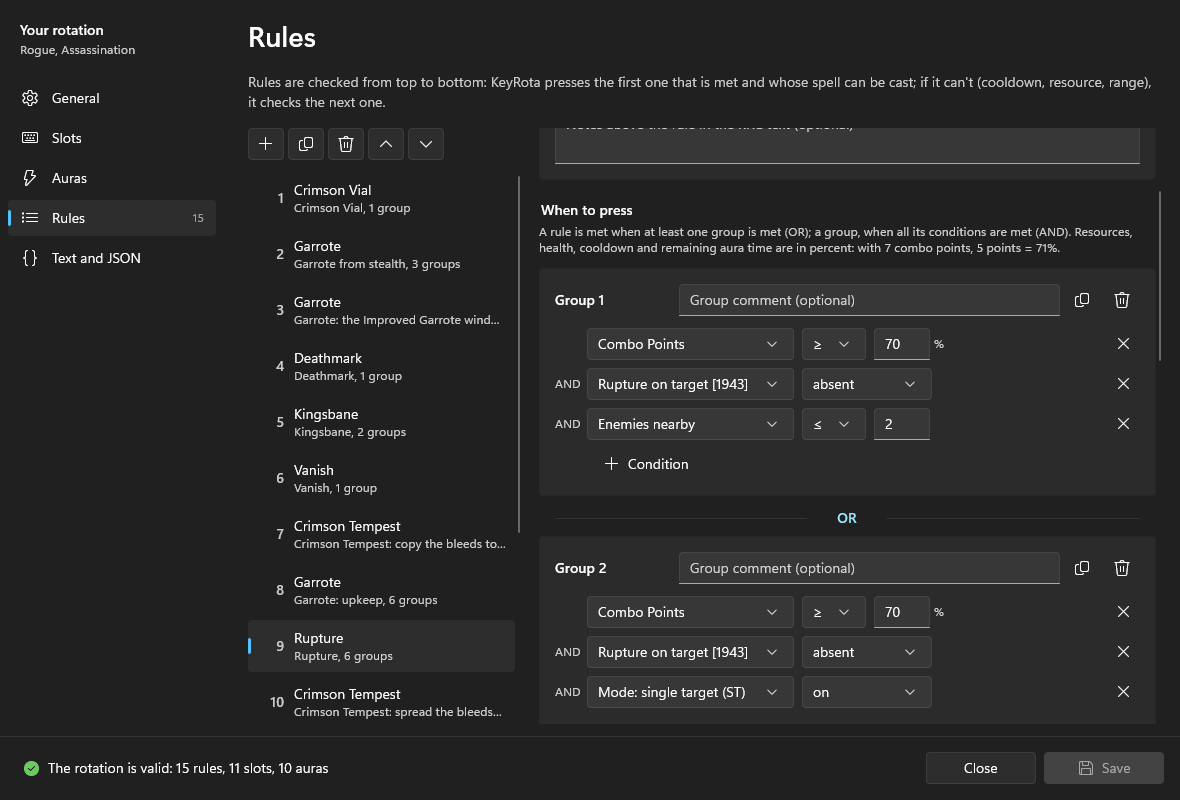
Each group has "Group N", a "Group comment" box and Duplicate group and Delete group buttons. A condition row has what to check, the property, the comparison and the number; the cross removes the condition. "+ Condition" adds a condition to the group, "+ Group (OR)" a new group. A group holds up to 16 conditions and a rule up to 16 groups: at the limit the buttons are disabled. A rule without groups says "No conditions: the rule fires whenever the spell can be cast".
| What to check | Properties | In KRC text |
|---|---|---|
| Auras (each aura of the rotation) | active, absent, remaining %, stacks | Garrote_DoT.up, .down, .duration <= 30, .stacks >= 3 |
| Slots (each slot) | ready, on cooldown, cooldown %, charges, glowing, not glowing | Kingsbane.ready, .oncd, .cd <= 3, .charges >= 2, .glow, .noglow |
| Resources | player and target health, the specialization's resources, % | PlayerHP <= 40, Energy >= 70 |
| Combat: Enemies nearby | a number | enemies >= 3 |
| Combat: Distance to target | yards | target.distance <= 8 |
| Quick settings panel | on, off | aoe == 1, st == 1, cd == 1, defensives == 1, ground_spells == 1, movement == 1 |
Comparisons: <, ≤, =, ≥, >; the number is 0 to 100. A new condition starts as "active" for the first aura; when you change what to check, the property and the number reset to defaults (≥ 50 for a resource, ≥ 2 for enemies, ≤ 8 for the distance). Every condition in detail: Conditions.
Errors and the status bar#
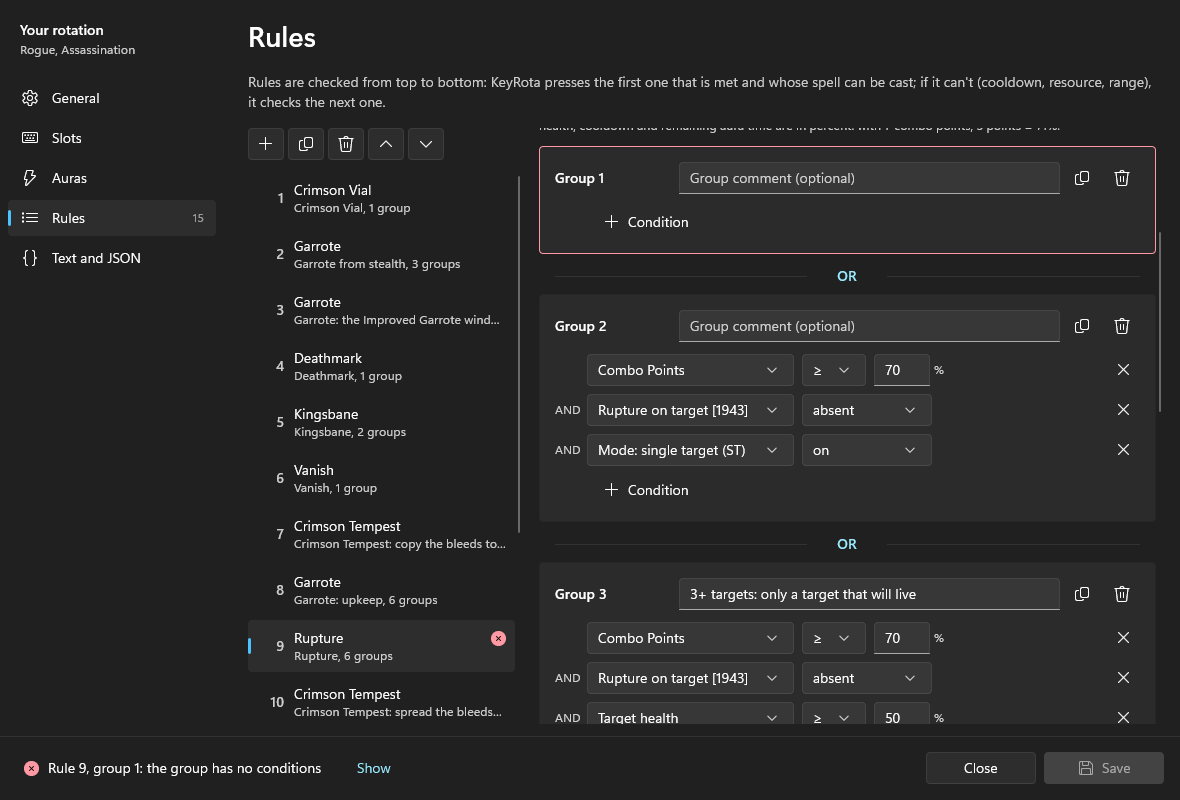
- Green: "The rotation is valid: …" — no errors, it can be saved.
- Red names the place: "Rule 9, group 1: the group has no conditions". Show opens that place. The rule is marked in the list, the group is outlined in red.
- A rotation with an error isn't saved: "A rotation with an error can't be saved: fix what's marked below".
- While the rotation runs you can't save: "Stop the rotation to save".
Text and JSON#
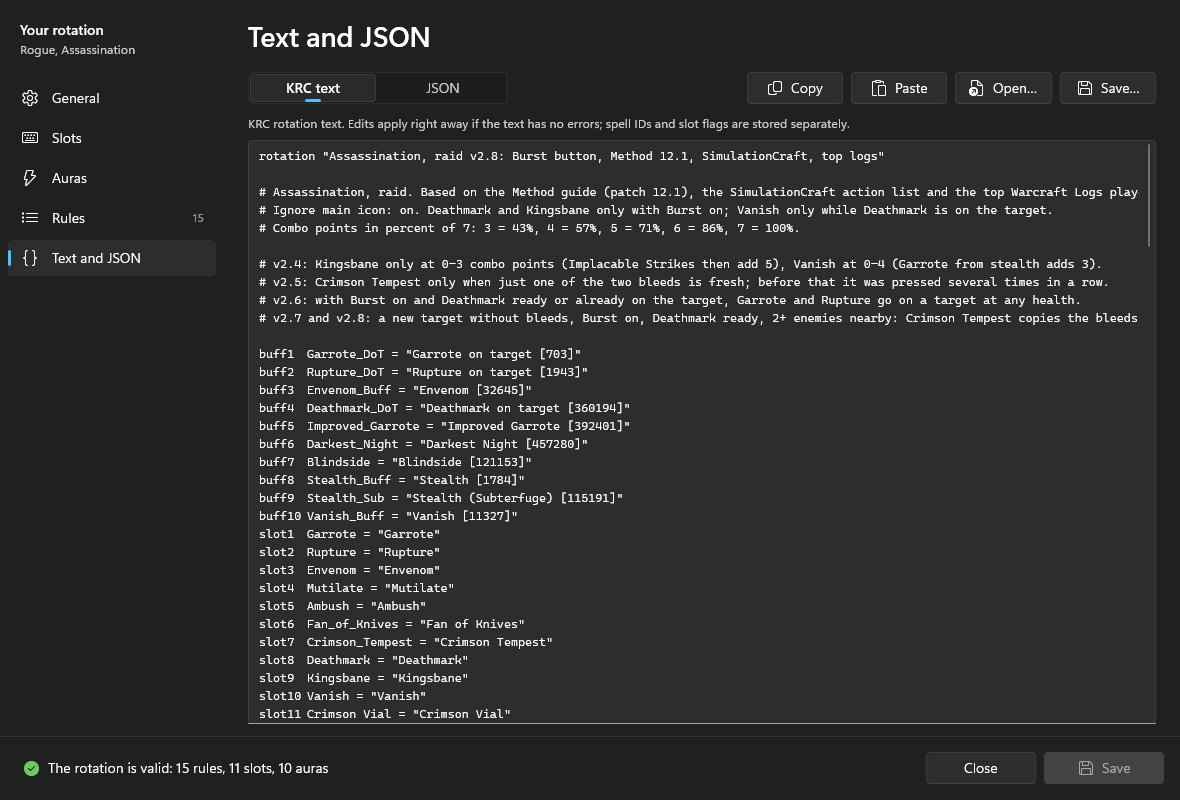
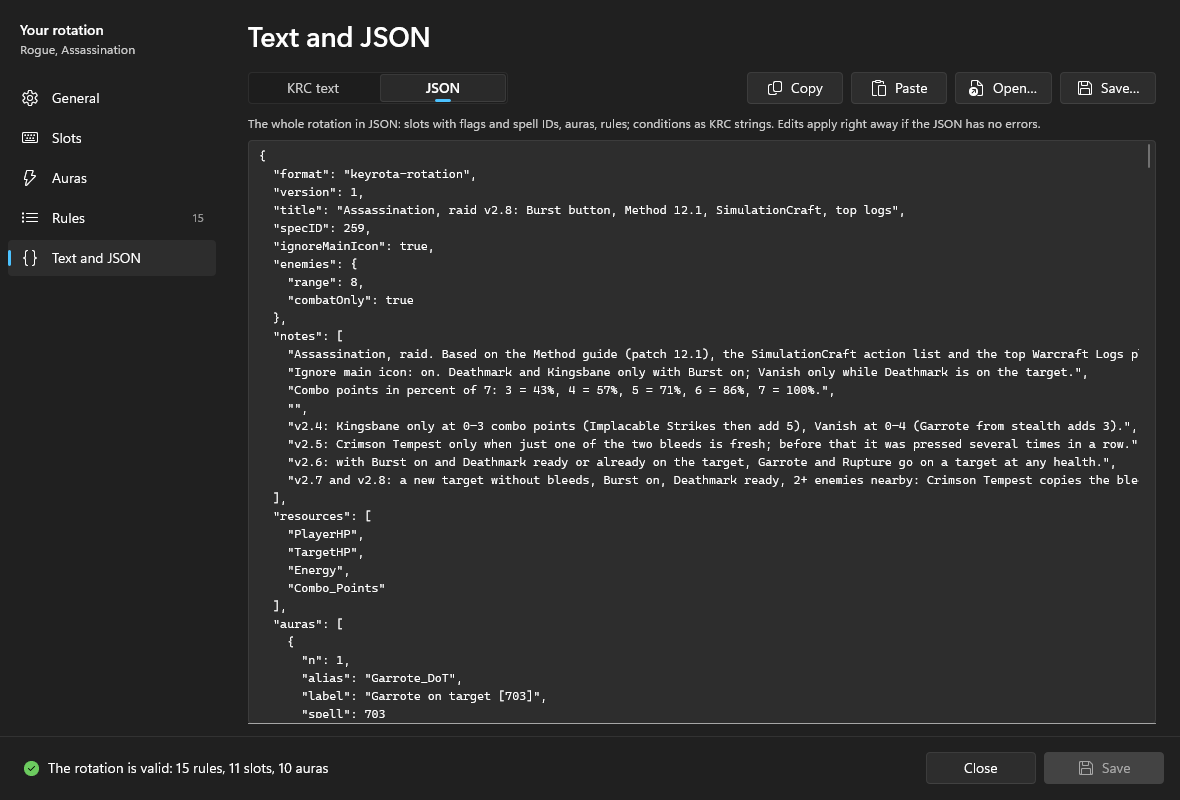
| Control | What it does |
|---|---|
| KRC text / JSON | Switches the view. |
| Copy | Copy the whole text or JSON. |
| Paste | Replace the rotation with the clipboard: KRC text, rotation JSON or a KeyRota profile. |
| Open… | Load a rotation from a .txt or .json file. |
| Save… | Save the current view to a file: the text as .txt, the JSON as .json. |
An edit in the box applies at once if it has no errors; an error shows under the box, and the other pages keep the last valid version.
What the text keeps and what only the JSON keeps. KRC text has no spell IDs, slot flags, With a target / In combat, specialization, Ignore main icon or enemy counter settings. When you edit the text, these stay with the slots and auras of the same numbers. The JSON keeps everything. When you paste or open a new version of the rotation, slots and auras with the same numbers keep their IDs, visibility and flags if the new version has none.
Saving and closing#
- Save (on Windows also Ctrl+S) writes the rotation into the profile; the button briefly shows Saved. A new rotation becomes a profile and is selected in the list.
- Closing with unsaved changes asks "Save changes?": Save, Don't save or Cancel. So does closing KeyRota.
- Export in the main window saves the profile with its rotation as JSON; Import accepts both a KeyRota profile and a bare rotation JSON.
Example: a rotation from scratch#
Let's build a small Assassination rotation: two DoTs (Garrote and Rupture), a builder (Mutilate), a spender (Envenom), a defensive (Crimson Vial at 40% health or lower) and a cooldown on the Burst button (Deathmark).
1. New profile. Rotation — New — In the builder….
2. General. Profile name: "Assassination: example". Specialization: Assassination (the resources become PlayerHP, TargetHP, Energy, Combo_Points). Rotation name: "Assassination: example v1". Ignore main icon: on.
3. Slots. For each row of the table: select the place on the left, click "Add slot", fill in Name, Spell ID and Name in text; for Crimson Vial choose In combat. No flags are needed.
| Slot | Name | ID | Name in text | Better Assistant shows it |
|---|---|---|---|---|
| 1 | Garrote | 703 | Garrote | With a target |
| 2 | Rupture | 1943 | Rupture | With a target |
| 3 | Envenom | 32645 | Envenom | With a target |
| 4 | Mutilate | 1329 | Mutilate | With a target |
| 5 | Deathmark | 360194 | Deathmark | With a target |
| 6 | Crimson Vial | 185311 | Crimson_Vial | In combat |
4. Auras. The same on the Auras page:
| Aura | Name | ID | Name in text |
|---|---|---|---|
| 1 | Garrote on target [703] | 703 | Garrote_DoT |
| 2 | Rupture on target [1943] | 1943 | Rupture_DoT |
| 3 | Envenom [32645] | 32645 | Envenom_Buff |
| 4 | Deathmark on target [360194] | 360194 | Deathmark_DoT |
5. Rules. On the Rules page click "+", choose the slot in Press and type the Name. "+ Group (OR)" adds a group with a default condition: change what to check, the property, the comparison and the number. "+ Condition" adds the next condition to the same group. The rules, in this order:
| # | Press | Groups (OR), conditions in a group (AND) |
|---|---|---|
| 1 | Crimson Vial | Healing / defense on, Player health ≤ 40 |
| 2 | Deathmark | Burst on, Garrote on target active, Rupture on target active, Envenom active |
| 3 | Garrote | (1) Garrote on target absent; (2) Garrote on target active, remaining ≤ 30% |
| 4 | Rupture | (1) Combo Points ≥ 70, Rupture on target absent; (2) Combo Points ≥ 70, Rupture on target active, remaining ≤ 30% |
| 5 | Envenom | (1) Combo Points ≥ 70, Envenom absent; (2) Combo Points ≥ 70, Envenom active, remaining ≤ 20%; (3) Combo Points ≥ 70, Energy ≥ 70; (4) Combo Points ≥ 70, Deathmark on target active |
| 6 | Mutilate | Combo Points < 70 |
Why:
- The defensive first: at low health Crimson Vial matters more than damage. It fires only when Healing / defense is on in the quick settings panel.
- Deathmark on Burst:
cd == 1is the Burst button (F3 on Windows, ⌃⇧B on macOS), not the spell's cooldown. Turn Burst off and Deathmark waits. - DoTs with the pandemic window: an absent aura has 0 left, so the refresh takes two groups: "no DoT" and "DoT up with ≤ 30% left".
- 5 combo points = 70: out of 7 combo points, 5 is 71%; the threshold
70works with any rounding. The table is in Resources. - Mutilate last and only below 5 combo points, so that no energy is wasted while Envenom waits for its conditions.
6. Check. The status bar should say "The rotation is valid: 6 rules, 6 slots, 4 auras". Open Text and JSON to see the same as below.
7. The Better Assistant profile. General — "Build from slots and auras" — "Copy"; in the game /ba — Profile — paste — Apply.
8. Keys. Put the six spells on your action bars and bind keys to them.
9. Run it. Save, close the window, choose the profile "Assassination: example" and start the rotation (F1 on Windows, ⌃⇧Space on macOS). On the quick settings panel turn on Healing / defense if you want Crimson Vial; the Burst button turns Deathmark on and off.
rotation "Assassination: example v1"

# Example from the KeyRota documentation: two bleeds, a builder, a spender with energy pooling,
# a defensive at low health and Deathmark on the Burst button.
# Combo points in percent of 7: 5 points = 71%, threshold 70 = 5+.

buff1	Garrote_DoT = "Garrote on target [703]"
buff2	Rupture_DoT = "Rupture on target [1943]"
buff3	Envenom_Buff = "Envenom [32645]"
buff4	Deathmark_DoT = "Deathmark on target [360194]"
slot1	Garrote = "Garrote"
slot2	Rupture = "Rupture"
slot3	Envenom = "Envenom"
slot4	Mutilate = "Mutilate"
slot5	Deathmark = "Deathmark"
slot6	Crimson_Vial = "Crimson Vial"
resource1	PlayerHP
resource2	TargetHP
resource3	Energy
resource4	Combo_Points

# --- Defensive: only with Healing / defense on ---
use Crimson_Vial when  # Crimson Vial
	defensives == 1 and PlayerHP <= 40  # health 40% or lower

# --- Cooldown: only with Burst on ---
use Deathmark when  # Deathmark
	cd == 1 and Garrote_DoT.up and Rupture_DoT.up and Envenom_Buff.up  # Burst on, bleeds and Envenom up

# --- Bleeds ---
use Garrote when  # Garrote
	Garrote_DoT.down  # no bleed
	or
	Garrote_DoT.up and Garrote_DoT.duration <= 30  # pandemic window: 30% or less left

use Rupture when  # Rupture
	Combo_Points >= 70 and Rupture_DoT.down  # 5+ combo points, no bleed
	or
	Combo_Points >= 70 and Rupture_DoT.up and Rupture_DoT.duration <= 30  # 5+ combo points, pandemic window

# --- Spender: 5+ combo points, pooling energy ---
use Envenom when  # Envenom
	Combo_Points >= 70 and Envenom_Buff.down  # no buff
	or
	Combo_Points >= 70 and Envenom_Buff.up and Envenom_Buff.duration <= 20  # buff running out
	or
	Combo_Points >= 70 and Energy >= 70  # don't cap energy
	or
	Combo_Points >= 70 and Deathmark_DoT.up  # Deathmark on the target

# --- Builder: below 5 combo points ---
use Mutilate when  # Mutilate
	Combo_Points < 70  # below 5 combo points
{
  "format": "keyrota-rotation",
  "version": 1,
  "title": "Assassination: example v1",
  "specID": 259,
  "ignoreMainIcon": true,
  "enemies": {"range": 8, "combatOnly": true},
  "notes": [
    "Example from the KeyRota documentation: two bleeds, a builder, a spender with energy pooling,",
    "a defensive at low health and Deathmark on the Burst button.",
    "Combo points in percent of 7: 5 points = 71%, threshold 70 = 5+."
  ],
  "resources": ["PlayerHP", "TargetHP", "Energy", "Combo_Points"],
  "auras": [
    {"n": 1, "alias": "Garrote_DoT", "label": "Garrote on target [703]", "spell": 703},
    {"n": 2, "alias": "Rupture_DoT", "label": "Rupture on target [1943]", "spell": 1943},
    {"n": 3, "alias": "Envenom_Buff", "label": "Envenom [32645]", "spell": 32645},
    {"n": 4, "alias": "Deathmark_DoT", "label": "Deathmark on target [360194]", "spell": 360194}
  ],
  "slots": [
    {"n": 1, "alias": "Garrote", "label": "Garrote", "spell": 703, "show": "target"},
    {"n": 2, "alias": "Rupture", "label": "Rupture", "spell": 1943, "show": "target"},
    {"n": 3, "alias": "Envenom", "label": "Envenom", "spell": 32645, "show": "target"},
    {"n": 4, "alias": "Mutilate", "label": "Mutilate", "spell": 1329, "show": "target"},
    {"n": 5, "alias": "Deathmark", "label": "Deathmark", "spell": 360194, "show": "target"},
    {"n": 6, "alias": "Crimson_Vial", "label": "Crimson Vial", "spell": 185311, "show": "combat"}
  ],
  "rules": [
    {
      "use": "Crimson_Vial",
      "name": "Crimson Vial",
      "note": ["--- Defensive: only with Healing / defense on ---"],
      "when": [{"all": ["defensives == 1", "PlayerHP <= 40"], "comment": "health 40% or lower"}]
    },
    {
      "use": "Deathmark",
      "name": "Deathmark",
      "note": ["--- Cooldown: only with Burst on ---"],
      "when": [
        {
          "all": ["cd == 1", "Garrote_DoT.up", "Rupture_DoT.up", "Envenom_Buff.up"],
          "comment": "Burst on, bleeds and Envenom up"
        }
      ]
    },
    {
      "use": "Garrote",
      "name": "Garrote",
      "note": ["--- Bleeds ---"],
      "when": [
        {"all": ["Garrote_DoT.down"], "comment": "no bleed"},
        {
          "all": ["Garrote_DoT.up", "Garrote_DoT.duration <= 30"],
          "comment": "pandemic window: 30% or less left"
        }
      ]
    },
    {
      "use": "Rupture",
      "name": "Rupture",
      "when": [
        {"all": ["Combo_Points >= 70", "Rupture_DoT.down"], "comment": "5+ combo points, no bleed"},
        {
          "all": ["Combo_Points >= 70", "Rupture_DoT.up", "Rupture_DoT.duration <= 30"],
          "comment": "5+ combo points, pandemic window"
        }
      ]
    },
    {
      "use": "Envenom",
      "name": "Envenom",
      "note": ["--- Spender: 5+ combo points, pooling energy ---"],
      "when": [
        {"all": ["Combo_Points >= 70", "Envenom_Buff.down"], "comment": "no buff"},
        {
          "all": ["Combo_Points >= 70", "Envenom_Buff.up", "Envenom_Buff.duration <= 20"],
          "comment": "buff running out"
        },
        {"all": ["Combo_Points >= 70", "Energy >= 70"], "comment": "don't cap energy"},
        {"all": ["Combo_Points >= 70", "Deathmark_DoT.up"], "comment": "Deathmark on the target"}
      ]
    },
    {
      "use": "Mutilate",
      "name": "Mutilate",
      "note": ["--- Builder: below 5 combo points ---"],
      "when": [{"all": ["Combo_Points < 70"], "comment": "below 5 combo points"}]
    }
  ]
}
Download this example: JSON, KRC text. Open it with Open… on the Text and JSON page or with New — From file….